Our App
Features
CONNECT
Get newest church info (events, signups, announcements, etc)
SCRIPTURE
Read Scripture, follow a reading plan, change versions, and the app will even read to you!
CALENDAR
The church calendar is at your fingertips! Use the events tab to see what's coming up in the next few weeks.
SERMONS
Don't miss a sermon! You can watch or listen to past sermons or revisit old series.
Easily access the live stream!
LOG IN FOR MORE FEATURES
*Be sure to log in with the email address you check! What you log in with will override the email we have for you in our system.
VOLUNTEER
If you're part of a rotating volunteer team, your schedule is in the profile field of the app! You can set your availability and accept/decline requests.
STAY INFORMED
Customize your push notifications from the app.
GROUP MESSAGES
Participate in your group's messages (if the group uses them)
GIVING
Get your giving statement; adjust or set up scheduled giving
You can also edit your church contact info, take notes, and customize your notifications!
Guide
sign up & log in
First Time:
Sign In:
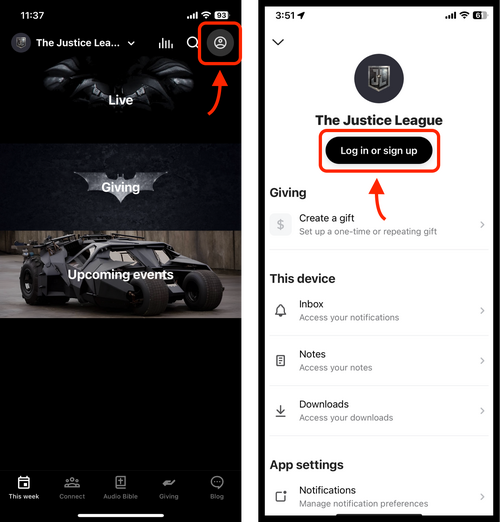
- open the app
- tap the Profile icon in the top right
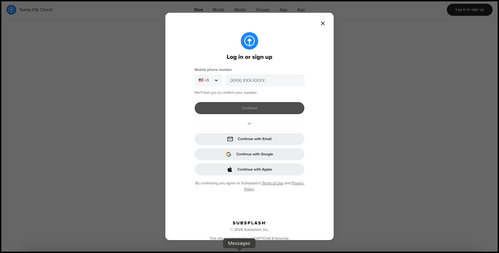
- then choose sign up
- the email you sign in with will update the email we have for you
Sign In:
- Pick the same login method you used before (Email, Google, Apple, or Phone)
- sign in with that same method so it connects to your existing account
Turn on Notifications:
We have several notification groups. Be sure to toggle on “General” for overall notifications.
If you still do not get notifications, also check your phone settings:
- Tap your Profile icon (top right).
- Tap Notifications.
- Toggle on the notification groups you want to receive.
If you still do not get notifications, also check your phone settings:
- iPhone: Settings → Notifications → your app → turn on Allow Notifications.
- Android: Settings → Apps & notifications → your app → App notifications → turn on Allow notifications.
Scheduler:
If you serve on a rotating volunteer team, you’ll find your schedule in the profile section of the app. Here you can accept or decline assigned dates, set your availability, as well as get your upcoming schedule. You'll also get reminders when you're scheduled to serve.
*if you don't have the app, you'll still be able to accept/decline volunteer requests through email.
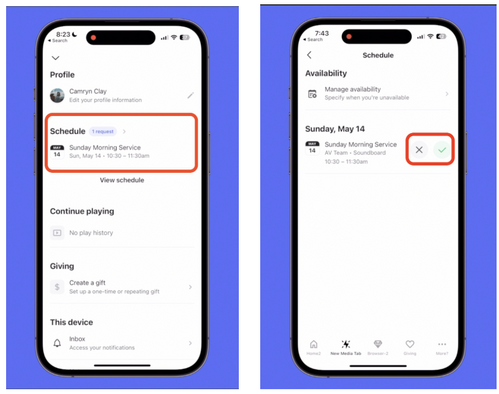
- Tap your profile (top right)
- Open the Schedule section (you’ll only see this if you’re signed in)
- To respond to a request: tap the request button, then accept or decline (it will double-check with you).
- To set when you can’t serve: in the Schedule section, tap Manage Availability and add your unavailability dates.
*if you don't have the app, you'll still be able to accept/decline volunteer requests through email.

GIVING:
To see your giving history, make changes to your giving, or change payment methods:
To give or start a recurring gift:
- Tap your profile
- Scroll to Giving Section
To give or start a recurring gift:
- Tap Give on the bottom menu
- Enter your giving information there
MESSAGING GROUPS:
- Tap the Messaging icon (top right)
- Tap Conversations to see groups you are in
- Type or respond to messages (you’ll get a notification when someone responds)
- Need a break from a conversation's notifications? You can mute them for a specified amount of time!
